
CTL is currently undergoing changes, and some tools on this page are under maintenance. We appreciate your patience during this transition. If you need immediate support, please submit a consult request here.
Cross-listing Courses in Canvas

Cross-listing allows you to move section enrollments from individual courses and combine them into one course. In Blackboard this process was called course stacking. This feature is helpful for instructors who teach several sections of the same course and only want to manage course data in one location.
Cross-listing should be done while courses are unpublished. Coursework is retained with the course, not with the section enrollments, so if a published course is cross-listed, all cross-listed enrollments will lose any associated assignment submissions and grades.
For more information regarding cross-listing in Canvas, please see this Canvas Community page.
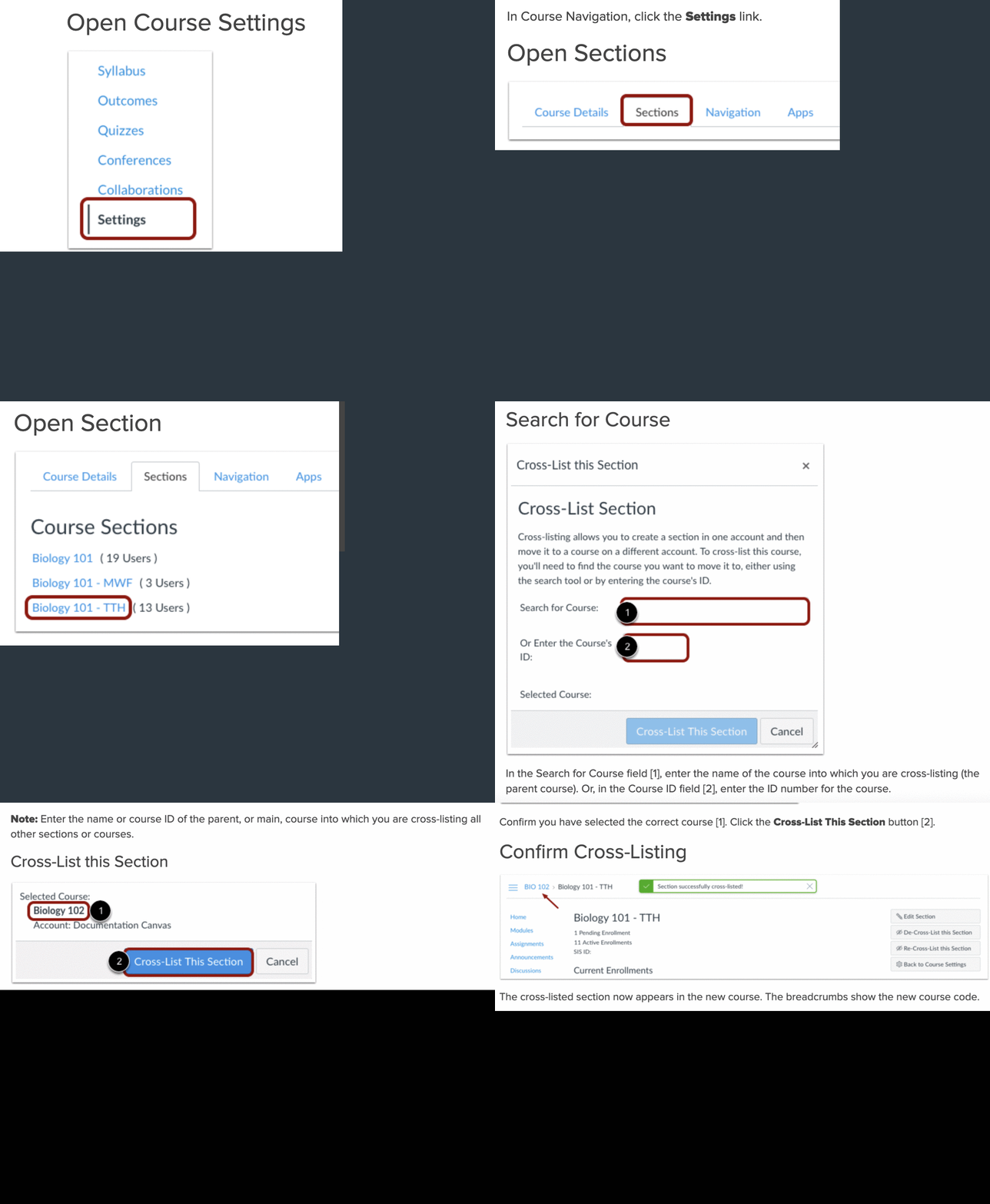
- Go to “Settings” at the bottom of the course menu.
- Select the “Sections” tab.
- Select the course section name.
- Select “Cross-list this Section”.
- Search for the course to cross-list and select it.
- Confirm the selected section to complete cross-listing.

